Scripting
Write JavaScript to modify proxied traffic.
Scripting lets you modify proxied requests and responses using JavaScript code. This gives you the greatest amount of flexibility to implement any custom logic you need.
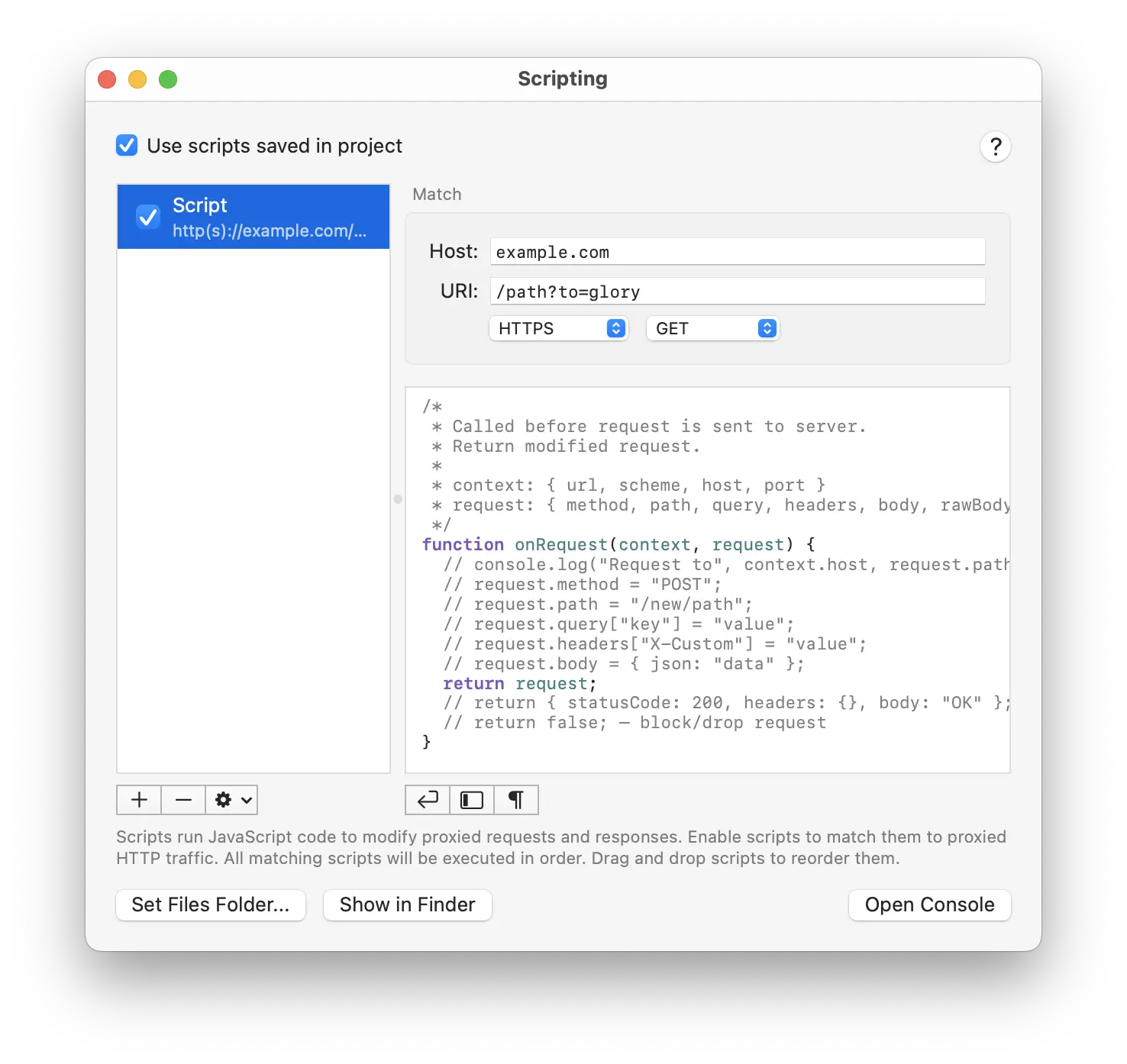
Scripts can be saved both globally in Proxygen app and in each project document. Toggle Use scripts saved in project to enable global or project specific scripts.
Add, remove and reorder scripts using the list on the left. You can quickly make duplicates of existing scripts.
Match
Execute scripts only for specific traffic by matching requests using protocol, method, host and URI fields. Leave these fields to default values to execute a script for all traffic.
Scripting
Each script has two callbacks
onRequestfor outgoing requestsonResponsefor incoming responses
Request editing
Examples of modifying a request in onRequest
/*
 * Called before request is sent to server.
 * Return modified request.
 *
 * context: { url, scheme, host, port, clientIpAddress, clientPort }
 * request: { method, path, query, headers, body, rawBody }
 */
function onRequest(context, request) {
	// log to console
	console.log("Request to", context.host, request.path);

	// change request method
	request.method = "POST";

	// change request path
	request.path = "/new/path";

	// add or replace query item
	request.query["key"] = "value";

	// delete query item
	delete request.query["key"];

	// add or replace header
	request.headers["X-Custom"] = "value";

	// delete header
	delete request.headers["X-Custom"];

	// set request body to JSON object
	request.body = { json: "data" };

	// return the modified request
	return request;

	// or return a new mock response
	return { statusCode: 200, headers: {}, body: "OK" };

	// or drop request
	return false;
}
Response editing
Examples of modifying a response in onResponse
/*
 * Called before response is returned to client.
 * Return modified response.
 *
 * context: { url, scheme, host, port, clientIpAddress, clientPort, serverIpAddress, serverPort }
 * request: { method, path, query, headers }
 * response: { statusCode, headers, body, rawBody }
 */
function onResponse(context, request, response) {
	// log to console
	console.log("Response", response.statusCode, context.url);

	// change status code
	response.statusCode = 200;

	// add or replace header
	response.headers["X-Modified"] = "true";

	// delete header
	delete response.headers["X-Custom"];

	// set response body to JSON object
	response.body = { json: "data" };

	// return modified response
	return response;
}
Utilities
The following utilities are available to scripts.
// encode string to Base64
btoa(string)

// decode Base64 to string
atob(base64String)

// encode string to hex
hexEncode(string)

// decode hex to string
hexDecode(hexString)

// hash
md5(string), sha1(string), sha256(string), sha512(string)

// HMAC ("md5", "sha1", "sha256", "sha512")
hmac(algorithm, key, data)

// generate random UUID
uuid()

// read text file as string or binary file as byte array
readFile(path)

// write string or byte array to file
writeFile(path, data)

// check if file exists
fileExists(path)

// decode JWT token { header, payload }
decodeJWT(token)

// convert object to query string
jsonToQuery(object)

// convert query string to object
queryToJson(string)

// log to console
console.log(), console.info(), console.debug(), console.error()
Note that readFile and writeFile functions only have access to a folder you have selected in using Set Files Folder option. This is due to app sandboxing restrictions.